How to Own Your AI Image Studio: No Subscriptions, No Data Collection, No Compromise
You don’t need a supercomputer to generate AI images.
OpenAI and Google have some amazing, powerful image- and video-generating tools. But I have a couple of issues with them. You need to pay for a subscription for the better models, and the instant you prompt anything, you’re giving them data for free. That usage data is valuable. They can use it to train models, create ads tailored to you, or sell it.
That’s the reason I run local AI servers.
Do I still use the cloud models? Yes, but I limit the data I give them and do most of my generative AI work locally.
Luckily, I used to be an Ethereum crypto miner back in the 2021 boom. I had hardware sitting around doing nothing now that mining cryptocurrency wasn’t profitable anymore. So when I discovered that consumer hardware could be used for AI, I immediately started researching.
It turns out a lot of people do this.
All you need is a PC with a graphics card. Preferably, one with at least 12GB of video memory (VRAM), but with enough system RAM and smaller models, you can make it work.
The hardware I had wasn’t the latest or the greatest. My best-performing GPU was an NVIDIA 3070 Founders Edition 8GB, but the ones with the most VRAM were my NVIDIA 3060s with 12GB. I also had a stockpile of AMD GPUs ranging from 8 to 12GB, but at the time, NVIDIA was the only option for image generation. (Today, AMD is a viable option.)
The Experiment
Now that it seemed possible with what I had, it was time to create a proof of concept. If I could build an AI server and make it work. I could later upgrade it with better hardware when I could afford it. I poked around my mining cave and picked out the best components I had available.
The Specs:
NVIDIA 3060 12GB
AMD Ryzen 2300X CPU
MSI B450 Motherboard
32GB (4x8GB) 2400 Mhz DDR4 RAM
1TB WD Blue SATA SSD
As you can see, this was a very modest system. Even when I originally built this machine, the hardware was getting old.
Now for the operating system.
At the time, Windows was the best option when using NVIDIA GPUs due to driver support. I prefer to use Linux when possible, but in this case, I had to make an exception. Today, I hear that driver support for NVIDIA graphics cards on Linux is leaps and bounds better than it was at that time.
Since Windows 11 was the only real option, I went with the Pro version. Windows 11 Pro lets you remote into the machine with minimal setup, especially if you are connecting from another Windows machine.
The AI image-generating software was the next decision.
I ended up using ComfyUI. It’s a tool that looks scary at first, but once you get the hang of it, it’s really powerful. They also now have templates with prebuilt workflows, making it easy to download the AI models that go with them.
Time to test the machine…
The first model I used was an early version of Flux. It seemed to have boomed onto the scene, and everyone was talking about it as the best local AI image-generating model at the time.
I unfortunately don’t remember the exact prompt for my first image. It was something along the lines of “Create an astronaut in a spacesuit on stage performing in front of a crowd.”
After sending the prompt, I waited patiently. I recall opening Task Manager to make sure the GPU was being used, then deciding to grab a cup of coffee. Several minutes later, I had my astronaut image.
The image wasn’t perfect, but neither were the cloud models back then.
I recall the astronaut looking pretty good, but many of the people in the crowd were weird-looking; some had flipper-like hands, or stretched faces. Essentially, old-school AI-generated people. I wish I had saved the image to include here, but it was from an old model I no longer use.
This first image did confirm something for me…
You can run an AI image generation server at home, and you don’t need the latest and greatest hardware to run it.
This opens the possibility for others to do the same at home, which aligns with my desire for greater data privacy and security with AI tools. You can run these tools completely air gapped, and you don’t have to worry about data leaks or your information being sold.
It’s a whole new world, and it’s right at the edge of our fingertips.
Here’s the real question: Can it run any models today?
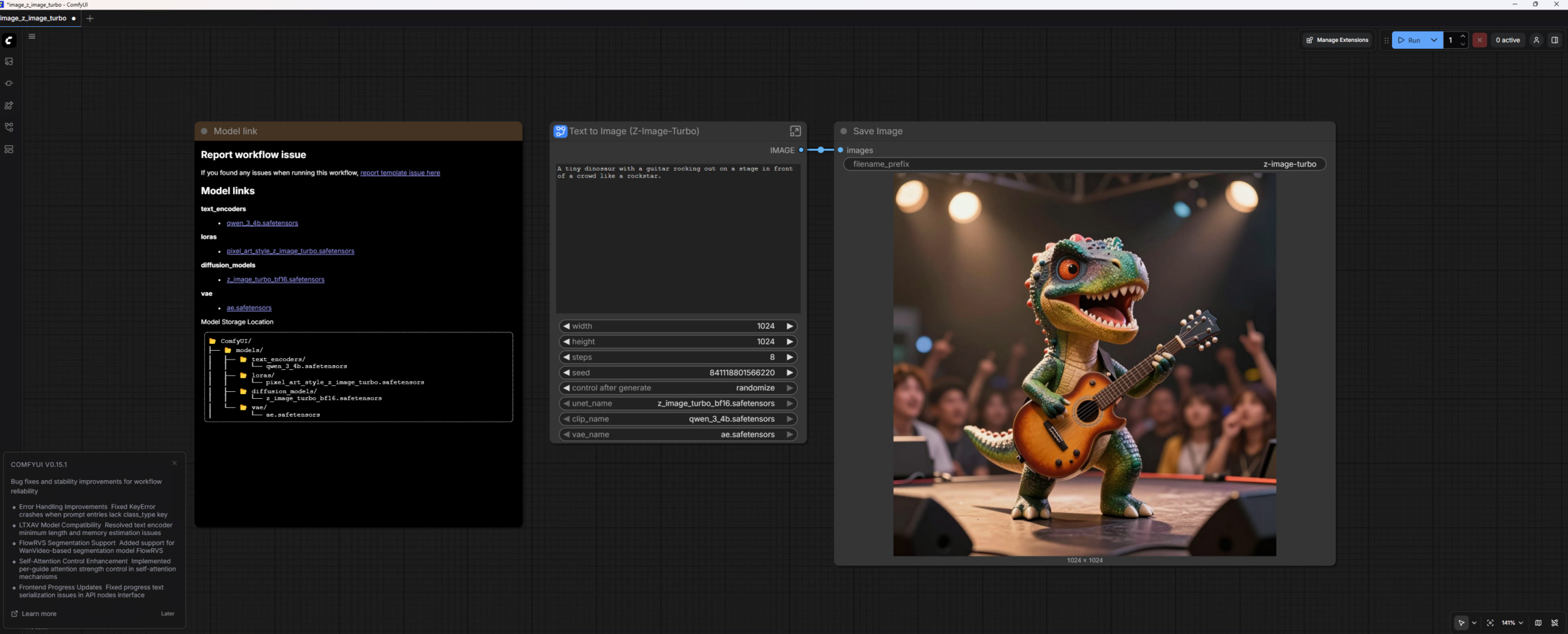
Absolutely! In ComfyUI, they have a template for Z-Image-Turbo, a text-to-image model. I can prompt for images and have it run mostly on the GPU, creating them in 30–50 seconds per image.
Here’s the prompt I tested with;
“A tiny dinosaur with a guitar rocking out on a stage in front of a crowd like a rockstar.”
It created this image below. I was hoping for a more realistic-looking dinosaur, but I still got a kick out of the image it created; it made it more fun. And I have to say, it looks pretty good, considering it ran on hardware that’s at least 5 years old.

The template workflows make it easy to run these models. For the most part, you need to download the models when prompted to do so if they aren’t already downloaded, write your prompt, and hit “Run”.
Here’s what the Z-Image-Turbo one looks like.
If you want to run your own AI Image Studio, you don’t need a supercomputer to do it. Just a basic machine with a GPU and enough RAM for the model, you can get one up and running for yourself.
I recently upgraded this machine to new hardware. It turns out that it has been helpful with some of the freelance video work I do, so the upgrade made sense. I’ll do a technical write-up about that build soon, so if you’re interested, give me a follow.
Have you run any image or video-generating tools locally?
I’d love to hear about your experiences and the hardware you use. Put them in the comments, and we can talk shop.
